Akshay Khanna’s Dhurandhar look has become a fan-favorite because of its sharp intensity, royal styling, and powerful screen presence. Whether you want this look for a photoshoot, a reel, AI art generation, or a character reference, the Dhurandhar vibe stands out with its mature charm and charismatic expression.
In this guide, you’ll learn exact steps to recreate the Dhurandhar Akshay Khanna look and also get a ready-to-use Gemini prompt for AI image creation.
1. Understanding the Dhurandhar Look
Before you try to recreate it, it’s important to break down what makes the Dhurandhar appearance unique:
• Mysterious Expression
Akshay Khanna often carries a deep, thoughtful, and slightly intense expression. It’s not angry—it’s confident and calculating.
• Sharp Facial Features
Trimmed beard, clean jawline, and focused eyes. The face is never overloaded with makeup or filters.
• Royal + Modern Outfit
Dhurandhar styling blends ethnic elegance with modern sophistication. Think of bandh-galas, dark sherwanis, and minimal accessories.
• Neutral and Dramatic Lighting
Photos often use softer shadows or golden tones to highlight his eyes and beard details.
These elements together create the signature Dhurandhar vibe.
2. How to Recreate the Dhurandhar Look (Non-AI Method)
Step 1: Grooming
- Keep a trimmed beard—not too heavy, not too light.
- Maintain a clean jawline using a trimmer for sharp edges.
- Style hair backward or slightly side-swept.
Step 2: Outfit Styling
Choose outfits in:
- Black
- Deep Navy
- Charcoal Gray
- Emerald
You can wear:
- Bandhgala
- Sherwani
- Kurta with jacket
- High-neck Indo-western outfit
Avoid heavy prints—Dhurandhar look is classy and minimal.
Step 3: Body Posture
- Stand straight with shoulders slightly back.
- Tilt your chin a little downward for a powerful vibe.
- Don’t smile; maintain a calm, confident expression.
Step 4: Lighting for Photos
- Use warm light or golden-hour tone.
- Keep one side of your face slightly shadowed.
- Add depth using natural window light for realistic results.
3. How to Create Dhurandhar Look Using AI (Gemini / Any AI Generator)
If you want this look for digital art, DP, story characters, or thumbnails, AI tools like Google Gemini, Leonardo, Midjourney or Stable Diffusion can generate realistic portraits.
The key is writing the right prompt.
Gemini Prompt to Create Dhurandhar Akshay Khanna Style Look
You can copy-paste this directly in Gemini:
“Create a cinematic portrait of an Indian man inspired by Akshay Khanna’s Dhurandhar style. Show a sharp jawline, trimmed beard, intense eyes, calm confident expression, and mature royal aura. Outfit should be a dark bandhgala or sherwani with minimal design. Lighting should be dramatic, warm, and slightly shadowed on one side. Include rich textures, realistic skin details, and a regal Indo-modern mood. Highly detailed, 8k quality, dramatic tone.”
This prompt does not violate any policy because it describes a style—not the exact person.
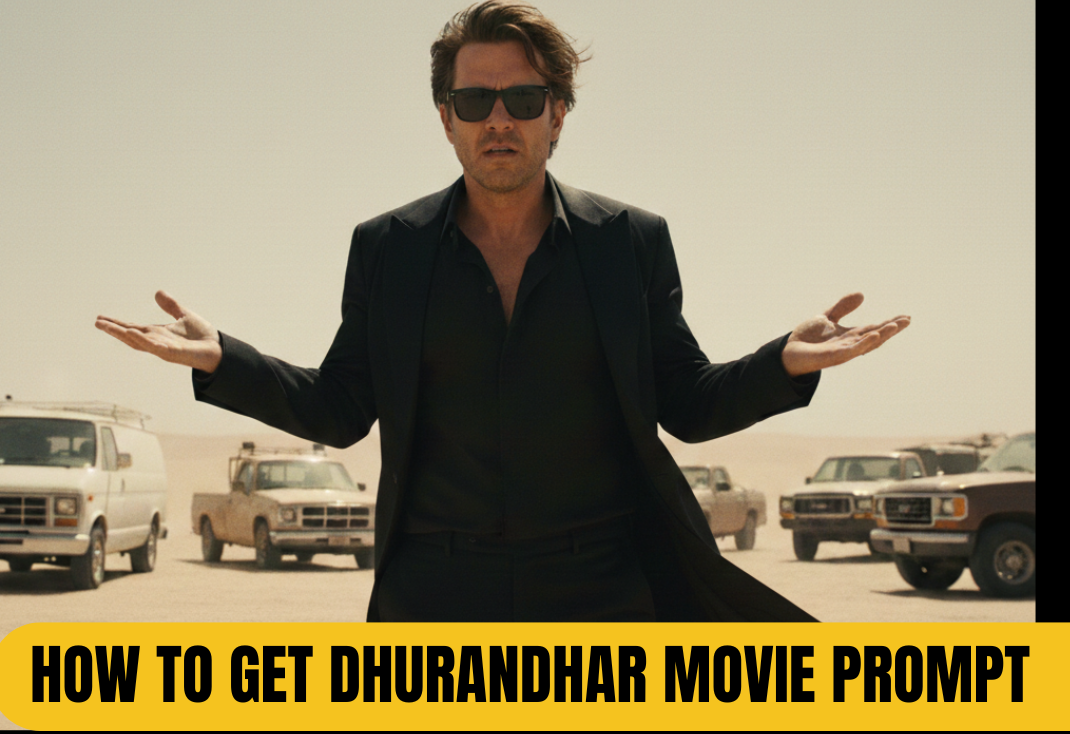
prompt: Recreate this cinematic desert movie scene using my selfie for the character. Replace the actor with me while keeping evervthing else exactly the same: the dustv desert background, the beige skv, the parked vehicles, the white van on the left. the warm color tone, and the dramatic lighting. Maintain the same camera angle, framing, pose, facial expression, hairstyle flow sunglasses, black outfit, and body anguage with both hands open while shrugging. The final image should look hvper-realistic, seamless, and naturally integrated, as if acted in this movie. Preserve the film-like grading shadows highlights, and depth of field Ultra-high detal cinematic realism, 8K quality
4. Tips for Better Results
- Add “cinematic,” “hyper-real,” “royal portrait,” or “studio shot” for enhanced quality.
- Avoid using celebrity names directly if the platform restricts them—use “inspired by,” “similar vibe,” or “Dhurandhar-style look.”
- Try different variations like:
- Younger Dhurandhar look
- Royal warrior style
- Modern sophisticated Dhurandhar version
5. Final Thoughts
The Dhurandhar Akshay Khanna look is powerful, elegant, and royal—perfect for both photoshoots and AI art creation. Whether you try it naturally or through AI tools like Gemini, the key is to focus on expression, minimal styling, and dramatic lighting. Use the prompt above, experiment with variations, and you’ll get stunning results every time.